Data-driven testing runs the same API request with multiple datasets to verify how the system behaves under different input conditions.
Step to Reproduce:
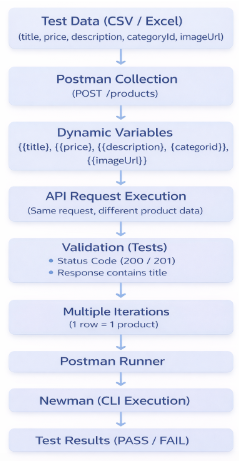
- Create a Postman request for
POST /products. For this example I will use https://api.escuelajs.co/api/v1/products - Replace request values with variables from the data file
- Add Postman tests to validate:
- status code
- response body
- Run the collection with the CSV/Excel data
- Execute again with Newman for repeatable CLI testing
- Newman Setup & Run
💻 Install Newman:
npm install -g newman
💻 Run collection with data file:
newman run <collection.json> -d <data.csv- Example
newman run api-ddt.json -d data.csv
- Example
Data-Driven API Testing Workflow
DDT Execution in Postman
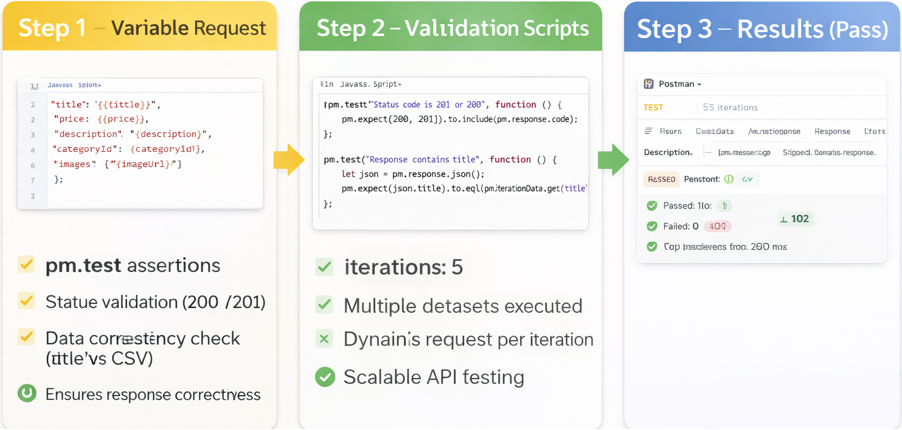
What This Demonstrates:
- Validation across multiple input combinations
- Consistent response verification
- Scalable API testing with reusable datasets
- Automation-ready execution with Newman
“Running one request is testing. Running many datasets is real QA.”